Of bel met William voor meer informatie of een persoonlijke demonstratie van het Socie-platform
Discover the two new Socie widgets!
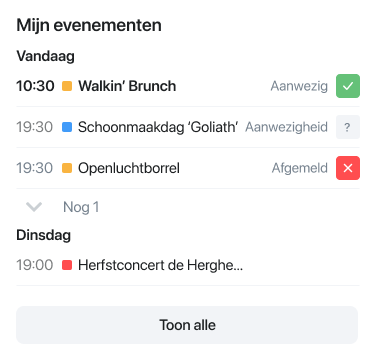
We at Socie have added two new widgets to the app. The “My events widget” fulfills the wish of many administrators to display the events of all calendars on the overview page (front page) of the app.
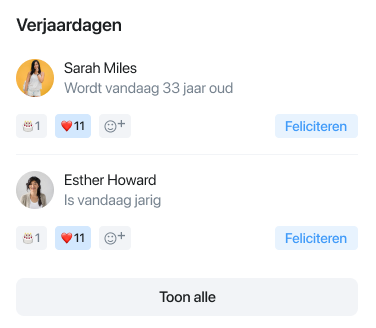
And with the new “Birthdays widget,” people are alerted to that day’s birthday on the front page of the app! Also a frequent wish of our users.
This is how you activate these modules:
Adding the 'my events widget'
If you created your app before Oct. 14, 2024, you must activate the “My events widget” yourself.
Login to your Administration. Then click on Modules,Overview and click on Widgets: Here choose + Add Widget and locate the ‘My events widget’. Choose Add.
Give it a prominent place on your front page by moving it with the up arrows. And choose Save.
Tip: If you have one or more calendar module(s) activated on your overview page, turn them off to avoid confusion.
Why should I activate the "my events widget"?
The “my events widget” shows all events from calendars & groups in 1 overview. This prevents people from thinking that 1 of your calendars is the general calendar. Read more about how calendars work in Socie here.
Adding the 'birthdays widget'
With the birthdays widget, you conjure the birthdays directly on your app overview screen.
You can also activate this widget yourself.
Login to your Administration. Then click on Modules, Overview and click on Widgets: Here choose + Add Widget and find the “birthdays widget.”Choose Add .
Give it a prominent place by moving it with the up arrows and choose Save.