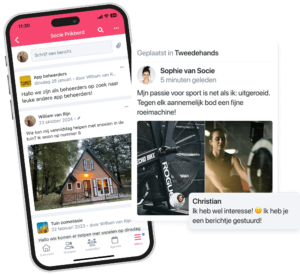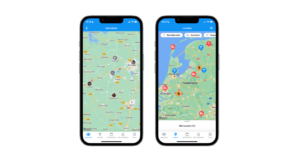


This new release of the Socie App marks a significant milestone. Version 5.0 of Socie includes features for Socie Chat, which will soon allow members to chat one-on-one with each other. In addition, there are improvements to events, tasks, and privacy, and “My Notifications” is now called “Inbox.”
Please note: Socie Chat is not yet available by default. We’re first rolling out the feature on a small scale within Socie communities to thoroughly test it in a live environment.
Socie Chat
With Socie Chat, members will soon be able to chat one-on-one with each other within the Socie App.
The chat feature will be made available to all administrators at a later date. First, we’re testing the feature within a smaller group of communities.
Want to learn more about Socie Chat?
- See how one-on-one chat works in the Socie App
- Check out the Socie Chat settings in Community Management.
Want to try Socie Chat now? Let us know through the admin panel.
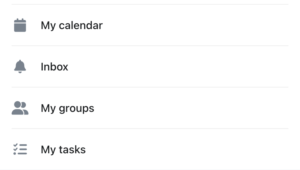
“My Reports” becomes “Inbox”
Starting with this version, the ” My Notifications ” screen is now called ” Inbox.”
- Notifications will still be visible here.
- When Socie Chat is enabled, you’ll also find chats in the Inbox.
- Notifications and chats each have their own page.
This keeps everything neatly organized in one place.
New Privacy Settings
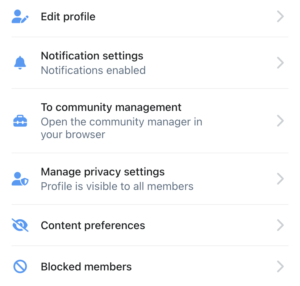
Two new privacy settings have been added to the ” My Membership ” page.
Content Preferences
Content Preferences let you choose which members’ content you don’t want to see.
Blocked Members
Under “Blocked Members,” you can see which members you have blocked. A blocked member cannot:
- view your profile
- send you chat messages
- tag you in posts
New in Events
A number of improvements have also been made to events.
- Location as a link. In addition to text, an event’s location can now also be a URL.
- Faster registration. If there’s only one option when registering, it’s automatically selected.
- End date visible. For events that last multiple days, the end date is now also displayed in the overview.
New in Tasks
Starting with this version, tasks are more clearly visible and easier to track.
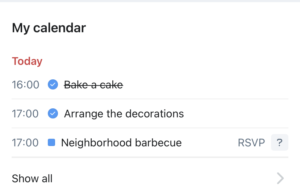
- Tasks are easily recognizable in My Events. In the My Events widget, tasks are marked with a checkmark icon. A completed task is crossed out.
- Notification upon assignment or removal. A member receives a notification when he or she is assigned to a task or removed from it.
- Availability is immediately visible. In the task overview, you can see how many spots are already filled. This makes it easy to tell right away if another person is needed.
Other improvements
- When editing a poll, a clearer warning is displayed when editing is no longer possible.
- The search function for members and groups is now always displayed. Previously, it only appeared when there were more than ten members or groups.
- HEIC files are compressed further, so they are less likely to be too large to upload.
Socie 5.0
With version 5.0, we’re taking the next step in Socie’s development. In addition to various practical improvements, we’re preparing the app for one-on-one chatting within your community.
Socie Chat isn’t widely available yet. Would you like to try out the feature early? Let us know through community management.