

When daily work turns into communicative chaos
Monday morning at the Sonnenschein care service: the team management is changing the schedule at short notice. Anna has to fill in at Mr. Müller’s because colleague Tim is sick. At the same time, Sara’s shift at Mrs. Becker is rescheduled due to an emergency.
Normally this goes through various channels: a WhatsApp message, a short phone call, a bill in the coffee room. But Anna does not see the message until she is already with the wrong patient, Sara gets the information too late, and some colleagues do not hear about the changes at all.
The result: double shifts, missed appointments, stressed employees and forgotten clients. Management calls from early morning to late at night to resolve misunderstandings – and patients have to wait longer than necessary.
Does this sound familiar? In many companies with employees without a permanent workplace – whether in healthcare, crafts or social organizations – communication is often a challenge.
Hier biedt Socie de oplossing.
One central place for everything – your digital team hub
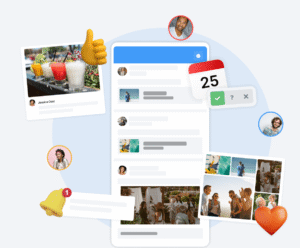
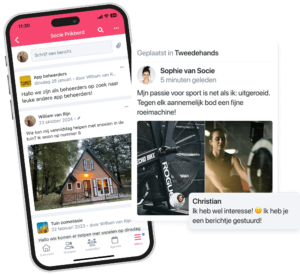
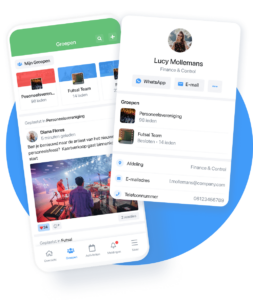
With Socie, your team’s daily work becomes a lot more organized. Socie is an app that allows teams to organize their members, shifts and activities in one central place – from rosters and events to internal communications and photo albums. This way, the whole team always stays connected, informed and involved.
Instead of keeping track of multiple channels at once, everything comes together in one place. Subgroups can easily be created – for example, for the morning and evening shift team, housekeeping or transportation.
That way every team member knows immediately what information is relevant. A new schedule? A reminder for the team meeting? A last-minute change in the trip plan? Everything appears directly in the app – clear and up-to-date.
Best of all, Socie is fully AVG-compliant and offers each member individual privacy settings. This keeps internal communication not only efficient, but also secure.

Schedule changes? No problem anymore!
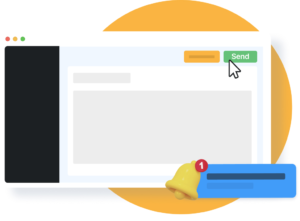
With Socie, information about rosters, routes or tasks can be easily shared via the “Events” module. If someone drops out, management can enter a changed shift immediately – and all affected employees automatically receive a push notification.
Example: Care management enters Anna’s new route in the calendar. Seconds later, Anna receives a reminder on her smartphone: “Route change – check new route.” No waiting, no guessing.
Automatic reminders can also be set. For example, employees receive a day’s notice about a training or team meeting – and no more important appointments are lost.
In addition, documents, checklists or photos can be shared directly in the app. If a team member wants to ask questions or provide information, they can do so via the chat function – all within the same app. Polls or voting rounds, for example about rosters or feedback on processes, are answered directly in the app and the results are immediately visible to administrators.
This is how real-time collaboration works: information no longer disappears into endless WhatsApp groups or piles of paper, and each team member always has the relevant content at hand – on the go with the smartphone or at the workplace via the web browser.
Everything at a glance – appointments, services and more
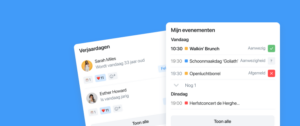
The Agenda module provides structure for daily work. Here all appointments are clearly displayed – from shifts to meetings, event events or holidays. Employees can confirm attendance, cancel or add comments directly in the app.
Example: The care service schedules an internal training day. All team members see the appointment directly in the calendar and can confirm their participation with one click. If times or locations change, a push notification automatically appears on the smartphone – without email chaos.
In addition, appointments can be assigned to specific groups or the entire community. This way, each department receives exactly the information relevant to them and other teams are not overloaded with unnecessary details.
Employees can also activate reminders, such as for regular team meetings or important deadlines. Socie sends these automatically, so no one forgets anything – especially useful for teams working on the road and not having a fixed workstation.
In addition, notes or attachments can be added directly to appointments. A training schedule, a script for an event or an important document is thus instantly available to everyone. Any team member can view the files, post comments or ask questions directly in the app – communication is fast and centralized, without using multiple channels.

Locations at a glance – for teams and field services
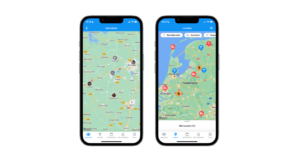
For companies, hospitals or healthcare services working at different locations or with clients on site, Socie’s Maps feature is particularly useful. Here, all relevant locations can be stored centrally – from headquarters to branch offices to patient or client addresses. Thus, employees always have an overview of all important locations directly in the app.
Example: The care team needs to visit several clients that day. Using the Maps feature, the staff can see all the addresses at a glance and quickly determine where to go next.
Internal locations can also be added: a hospital or company with multiple buildings can put the addresses in the app, so that new employees or colleagues changing locations know immediately where to go.
In addition, important comments or directions can be added to each location – for example, parking information, contacts or access instructions. Thus, the app reduces misunderstandings and saves time when coordinating and executing services or appointments.
More structure, less stress
With Socie, you maintain an overview – even without a desk. Schedules, appointments and messages are bundled centrally and every team member always stays informed.
This means less stress, fewer misunderstandings and more time for what really matters: good work, satisfied employees and a strong team feeling.
Start your own app for employees now.